Business requirement
Start with the outcome, users, data, security, and ownership.
Custom code should earn its place
Build secure, maintainable SharePoint and Microsoft 365 experiences with SPFx, React, Microsoft Graph, PnPjs and supported Microsoft APIs.
Start with the requirement. If native Microsoft 365 or Power Platform is enough, SPFx should not be forced. If custom engineering is justified, design it for security, maintainability, and production support.

Custom engineering with a support model.
SPFx belongs where native Microsoft 365 or Power Platform cannot meet the requirement cleanly.
What happens first
The first conversation clarifies the requirement, existing customization risk, data and API needs, and whether SPFx is actually the right engineering path.
Initial consultation is used to determine whether SPFx is justified and what review, architecture, or delivery engagement should follow.
Best for
Who should attend
What to bring
What you get
Decision first
SPFx is powerful, but it is not the default answer. A good service engagement should test the requirement against native SharePoint, JSON formatting, Power Platform, and supported Microsoft 365 capabilities before recommending custom code.
Start with the outcome, users, data, security, and ownership.
Use modern SharePoint, lists, libraries, pages, views, navigation, or search when they fit.
Use supported formatting for presentation-only list or library experiences.
Use Power Apps or Power Automate where the requirement is a form, app, approval, or process.
Use SPFx when custom SharePoint UI, extensions, or Microsoft 365 integration truly need pro-code engineering.
Commercial capability
Custom SharePoint engineering is most valuable when the user experience, data model, integration boundary, and support model are clear.
Role-aware SharePoint components, dashboards, document tools, and guided user experiences.
Application Customizers, Field Customizers, and ListView Command Sets where supported extension points fit.
SharePoint experiences that combine list data, files, users, groups, and Microsoft 365 signals.
Custom actions, metadata-led interfaces, list/library workflows, and document workspace UI.
Targeted experiences when native search or navigation does not satisfy the scenario.
Secure SharePoint interfaces connected to approved APIs and enterprise systems.
Architecture
The design should separate user experience, service-layer access, permissions, configuration, and deployment. That keeps the component understandable after the first release.
React, TypeScript, accessibility, responsive behavior, and Fluent UI where it fits.
PnPjs, SharePoint REST, Microsoft Graph, paging, errors, and approved API boundaries.
App Catalog deployment, environment configuration, tenant approvals, validation, and support handoff.
Core engineering domains
Architecture blueprint
Signed-in user
Microsoft Entra ID context
SPFx shell
SharePoint-hosted component
React experience
Typed, accessible UI
Service layer
Data access and API orchestration
Approved resources
SharePoint, Graph, business APIs
Security boundary
Browser SPFx code uses approved delegated access. Secrets and privileged credentials stay behind secured server-side services.
Integration
The API choice should follow the resource and permission model. Graph does not replace SharePoint APIs, and PnPjs is not a security boundary. Each integration needs the right responsibility.
Use SharePoint REST or PnPjs for SharePoint-native operations such as lists, libraries, files, metadata, and site data.
Use Graph for Microsoft 365 data where the resource, permission model, and tenant approvals fit the scenario.
Connect to business systems through a secure API approach. Protected credentials belong behind a backend or mediation layer, not in browser SPFx code.
Security and permissions
A credible SPFx solution is explicit about identity, least privilege, data access, tenant approvals, and what must never be placed in the browser.
SPFx runs in the signed-in user context and should align with Microsoft Entra ID and tenant governance.
Graph and API access should be planned around least privilege, admin consent, and clear business justification.
Components should validate inputs, avoid over-fetching, handle errors, and respect user authorization.
Client secrets, API keys, and sensitive credentials must not be embedded in SPFx browser bundles.
Legacy modernization
Legacy SharePoint customizations should be assessed before they are rebuilt. Some can be retired, some can move to native Microsoft 365 or Power Platform, and some justify SPFx.
Assess dependencies, DOM manipulation, hard-coded URLs, API calls, authentication, and whether SPFx is even required.
Review architecture, dependencies, large components, duplicated API logic, Graph permissions, packaging, performance, and maintainability.
Connect SPFx decisions to broader modernization of pages, navigation, forms, workflows, and information architecture.
If the SPFx question is part of a larger classic SharePoint or migration program, connect the engineering decision to the broader architecture first.
Delivery
The service path is designed to avoid custom code for its own sake and to leave behind a solution that can be maintained.
Clarify the requirement, audience, data sources, owners, risks, and constraints.
Confirm native Microsoft 365, Power Platform, or SPFx as the right target.
Define component architecture, permissions, integration boundaries, deployment, and validation.
Implement maintainable React, TypeScript, services, error handling, and configuration.
Test permissions, data, performance, accessibility, browser behavior, and user scenarios.
Package, version, release through App Catalog, and document operational ownership.
Support upgrades, dependency health, remediation, and lifecycle decisions.
Deployment and ALM
SPFx delivery should include package versioning, App Catalog deployment, environment configuration, tenant approvals for API access, validation gates, and support handoff.
Release pipeline
Requirement
Architecture
Solution package
App Catalog
Tenant approvals
Validation
Production release
Operational support
Controlled solution package and release notes.
API permissions reviewed before production.
Functional, permission, browser, and data checks.
Owner, configuration, and operating notes documented.
Engagement output
Engineering engagements end with a reviewed solution and documented ownership, not just working code.
React structure, service boundaries, and state strategy for the requirement.
Implemented components with permission-aware data access.
Least-privilege scopes, consent flow, paging, and error handling.
Versioned solution package, App Catalog deployment, and tenant approvals.
Tested permissions, browsers, and documented operating ownership.
Production quality
A component is not production-ready just because it renders. The code, permissions, deployment model, and support path all matter.
Design for lean bundles, controlled data calls, paging, batching where suitable, and measured rendering paths.
Use semantic structure, keyboard-friendly controls, visible focus, adequate contrast, and text alternatives for visual diagrams.
Separate React UI from services, configuration, permissions, and integration logic so the solution can be supported.
Avoid unnecessary dependencies, document versions, and plan package updates instead of treating deployment as the finish line.
Evidence of expertise
These resources are technical proof points and reference material. They are not customer case studies, testimonials, or claimed client outcomes.
Sample deliverable
Illustrative review output covering solution context, customizations, maintainability, permissions, target architecture, and delivery priorities.
Example SPFx review output, not a real customer engagement.
SPFx Hub
Topic hub for SPFx web parts, extensions, React, PnPjs, Microsoft Graph, deployment, and troubleshooting.
Depth across the full SPFx lifecycle.
Technical guide
A complete lifecycle guide covering setup, build, connect, secure, test, package, deploy, operate, and troubleshoot.
End-to-end engineering method.
Technical guide
Component architecture, hooks, service boundaries, and maintainable React patterns inside SPFx.
Modern UI architecture discipline.
Technical guide
SharePoint list, library, file, and service-layer access patterns using PnPjs where it fits.
SharePoint data-access fluency.
Technical guide
Delegated permissions, Graph client access, data boundaries, errors, paging, and throttling considerations.
Microsoft 365 integration depth.
Troubleshooting guide
Practical diagnosis for build, deployment, Graph, PnPjs, runtime, CORS, and production issues.
Support and remediation capability.
Business use cases
SPFx fits specific scenarios where supported SharePoint customization is justified. It is not necessary for every SharePoint improvement.
Custom role-based SharePoint experiences when native pages and web parts are not enough.
Interfaces combining SharePoint, Microsoft 365, and enterprise data sources.
Document-centric actions, metadata, and guided library experiences.
Custom result experiences where native search does not meet the requirement.
Custom UI around SharePoint data, workflows, approvals, and operational tasks.
SharePoint surfaces connected to secure business APIs and Microsoft 365 services.
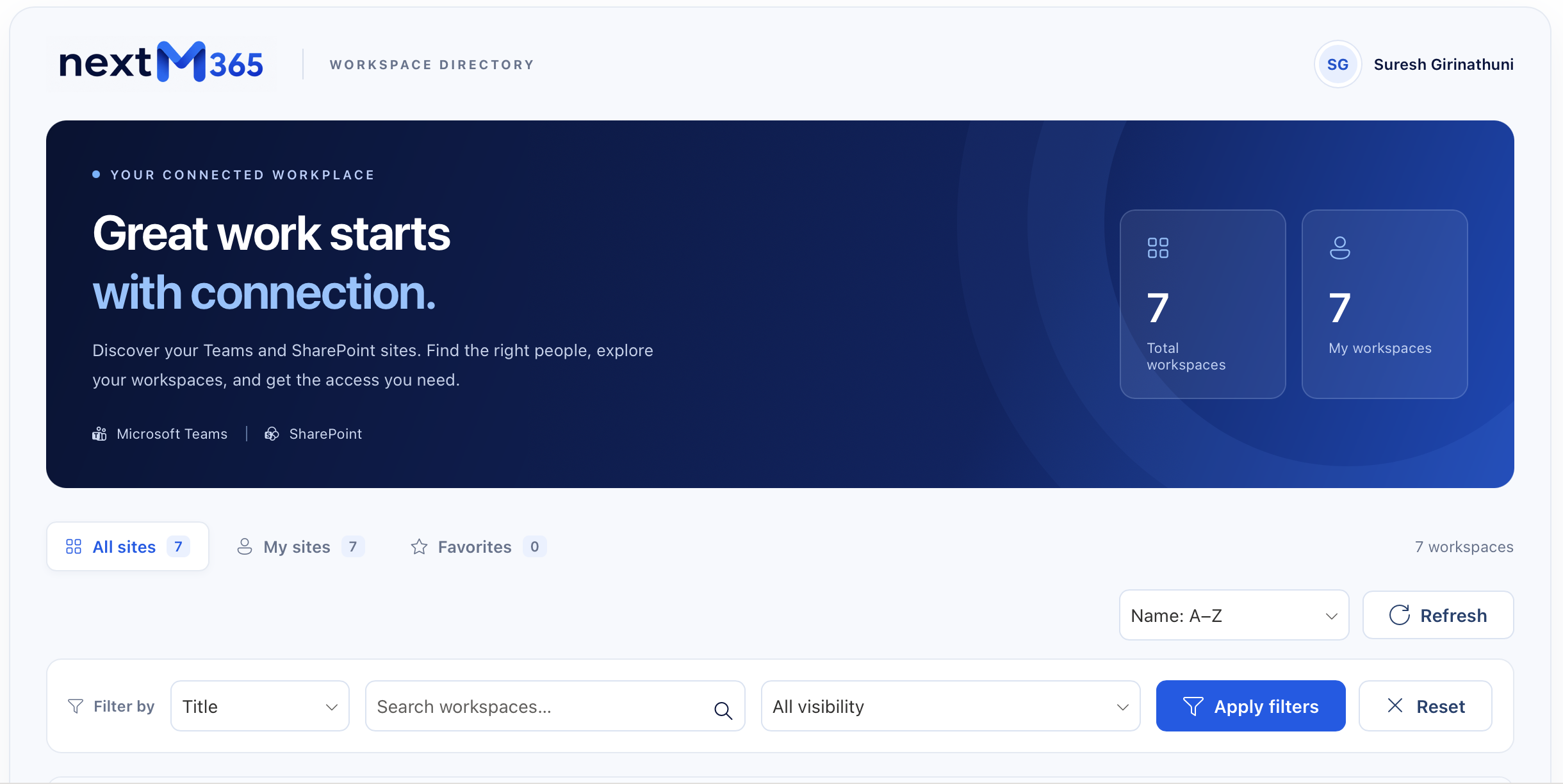
A central directory to discover Microsoft Teams and SharePoint workspaces, find owners, save favorites, and request access.
Explore the projectQualification
This service is for organizations that need an evidence-based architecture decision and, where justified, production-focused SPFx engineering.
Native components do not satisfy the user experience or interaction model.
Script Editor, JavaScript, legacy web parts, or existing SPFx needs supported modernization.
The experience requires Graph, SharePoint APIs, users, groups, files, or cross-workload data.
SharePoint must interact with secured business systems through the right API boundary.
An existing solution has architecture, security, performance, deployment, or maintainability problems.
Customizations need decisions before moving or redesigning the target SharePoint environment.
Scope boundaries
The discovery conversation defines what is included. These items are scoped separately when they apply to your environment.
Work outside the SharePoint Framework needs separate scoping.
New enterprise APIs behind SPFx components are separate backend scope.
Entra redesign beyond solution permissions is a separate engagement.
Apps and flows outside the SPFx solution are scoped separately.
Ongoing maintenance continues under a support agreement when one is defined.
FAQ
Use SPFx only when native Microsoft 365, list/library formatting, standard pages, or supported configuration cannot satisfy the requirement cleanly.
Power Apps often fits forms and business apps. SPFx fits custom SharePoint UI, extensions, document/library experiences, and pro-code Microsoft 365 integrations. The requirement decides.
Yes, when the required Graph permissions are available, approved, and scoped to the scenario. Access should follow least privilege.
Yes, but sensitive credentials must not live in SPFx browser code. Protected integrations usually need a secure backend or API mediation layer.
Yes, after assessing whether the requirement still matters and whether native SharePoint, JSON formatting, Power Platform, or SPFx is the right target.
Yes. Reviews can cover dependencies, architecture, React structure, Graph permissions, PnPjs or REST issues, App Catalog deployment, performance, and maintainability.
SPFx solutions are packaged, versioned, and deployed through an App Catalog with the right tenant or site governance and permission approvals.
Start with a short discovery conversation about the requirement, existing environment, data sources, security needs, and whether SPFx is justified.
Start with the requirement
Let us determine whether the requirement needs native Microsoft 365, Power Platform, or custom SPFx engineering.